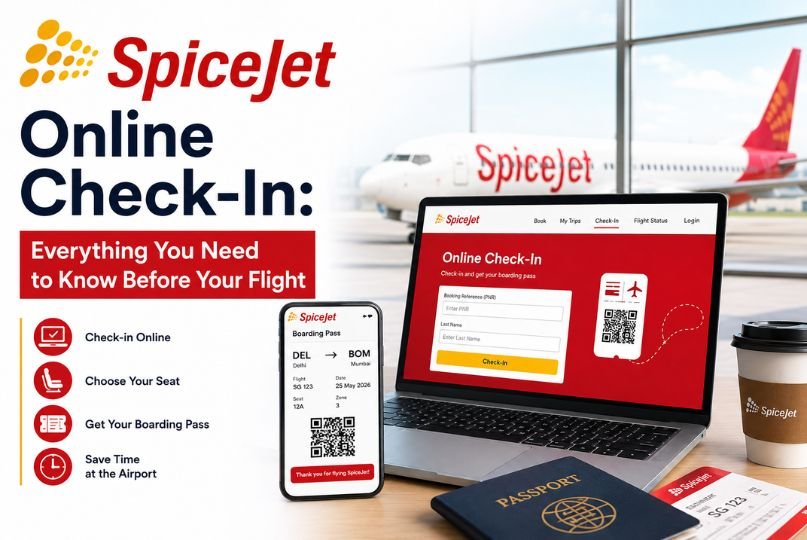
Planning to fly with SpiceJet? One of the easiest ways to make your airport experience smoother is to complete your SpiceJet online check-in before leaving home. Instead of waiting in a long queue at the airport just to check in, passengers can use the airline’s online check-in facility to save time, confirm their flight details, and get ready for boarding.
Whether you’re flying for business, heading on vacation, or visiting family, knowing how the SpiceJet check-in process works can help you avoid unnecessary last-minute stress.
In this guide, we’ll explain how to do SpiceJet online check-in, when you can check in, how to download your boarding pass, seat selection, baggage requirements, common issues, and important tips to remember before your flight.
What Is SpiceJet Online Check-In?
SpiceJet online check-in is a digital facility that allows eligible passengers to complete the check-in process through the airline’s website before reaching the airport.
During online check-in, you may be able to:
- Confirm your passenger and flight details
- Select or confirm your seat, depending on availability and fare rules
- Complete the check-in process
- Access your boarding pass
- Save or print your boarding pass before traveling
Online check-in is particularly useful if you want to spend less time at the airport.
However, completing online check-in does not necessarily mean you can skip every airport counter. Passengers carrying checked baggage may still need to visit the baggage drop or airline counter before proceeding to security.
Why Should You Check In Online?
There are several good reasons to complete your SpiceJet web check-in before arriving at the airport.
1. Save Time at the Airport
Online check-in can reduce the amount of time you spend waiting at a traditional check-in counter.
2. Choose Your Seat
Depending on your fare, route, and availability, you may have the option to select a preferred seat during the booking or check-in process.
3. Get Your Boarding Pass Early
Once check-in is completed, you can access your boarding pass and keep it ready for your journey.
4. Reduce Last-Minute Stress
Checking in ahead of time lets you confirm important travel details before heading to the airport.
5. Easier Travel Planning
Knowing your check-in status, seat information, and boarding requirements in advance can make your airport experience more organized.
How to Do SpiceJet Online Check-In?
The SpiceJet online check-in process is designed to be straightforward. Before starting, keep your booking details handy.
Step 1: Visit the SpiceJet Website
Open the official SpiceJet website using your smartphone, tablet, or computer.
Look for the Check-In option on the website.
Step 2: Enter Your Booking Details
You’ll generally need to provide information associated with your reservation, such as your booking reference/PNR and passenger details.
Enter the requested information carefully.
Step 3: Retrieve Your Booking
After submitting the details, your flight reservation should be displayed if it is eligible for online check-in.
Check the flight number, travel date, passenger name, and destination carefully.
Step 4: Select Your Seat
If seat selection is available for your booking, you may see a seat map.
Depending on your fare and selected seat, additional charges may apply. If you don’t want to pay for a particular seat, review the available options and fare conditions before confirming.
Step 5: Confirm Your Check-In
Review the information shown on the screen and complete the check-in process.
Make sure your name and flight details are correct before proceeding.
Step 6: Download or Save Your Boarding Pass
After successful check-in, access your boarding pass.
You can save it on your phone or print a copy, depending on your preference and airport requirements.
Tip: Keep your boarding pass easily accessible because you may need it at security and during boarding.
When Should You Complete SpiceJet Web Check-In?
The exact online check-in window can vary based on factors such as your flight, route, airport, and current airline policies.
For this reason, passengers should always verify the latest check-in opening and closing times directly with SpiceJet before traveling.
Don’t leave online check-in until the last possible moment. Even if you intend to check in online, arriving at the airport with sufficient time is important.
Remember that online check-in time and airport check-in or boarding deadlines are not necessarily the same thing.
What Do You Need for SpiceJet Online Check-In?
Before starting your check-in, keep the following information available:
- SpiceJet booking reference or PNR
- Passenger details
- Flight date and destination
- Valid identification documents
- Smartphone, tablet, or computer with internet access
- Any required travel documents for your route
For international travel, passengers may need additional documents, such as a passport, visa, or other required entry documents.
Always check the documentation requirements applicable to your destination before traveling.
Can You Select a Seat During SpiceJet Online Check-In?
Seat selection may be available depending on your booking, fare type, aircraft configuration, and seat availability.
Some seats may be included or assigned according to your fare conditions, while preferred seats or particular locations can involve an additional charge.
If you have a specific preference—such as a window or aisle seat—it’s better to check availability early rather than waiting until the airport.
Keep in mind that seat availability can change, and a particular seat cannot always be guaranteed.
How to Get Your SpiceJet Boarding Pass?
After successfully completing online check-in, you can access your boarding pass through the available online check-in flow.
Depending on the process available for your booking, you may be able to:
- View the boarding pass online.
- Save it to your mobile device.
- Print a physical copy.
- Present the digital boarding pass where accepted.
Before leaving for the airport, make sure the boarding pass is easily accessible on your phone.
It’s also smart to keep your phone sufficiently charged.
What If You Have Checked Baggage?
Online check-in does not eliminate the need to drop checked baggage.
If you’re traveling with luggage that needs to be checked into the aircraft’s hold, you should proceed to the appropriate SpiceJet baggage drop or check-in facility at the airport.
At the airport, you may need to:
- Show your boarding pass
- Present your identification or travel documents
- Hand over checked baggage
- Complete baggage formalities
- Proceed to security after baggage drop
Passengers traveling with only cabin baggage may have a simpler airport process, subject to the airport and airline requirements.
SpiceJet Cabin Baggage and Checked Baggage
Baggage allowances can depend on your fare type, route, ticket conditions, and other factors.
Before traveling, check your booking confirmation and SpiceJet’s latest baggage policy rather than relying on an old baggage allowance mentioned in a blog or social media post.
Cabin Baggage
Your cabin baggage must meet the airline’s applicable size and weight restrictions. Oversized or overweight baggage may not be accepted as standard cabin baggage.
Checked Baggage
Checked baggage allowances can vary by itinerary and fare. Additional baggage may be subject to extra charges.
Pro tip: Weigh your luggage before leaving home. This can help you avoid surprises at the airport.
What Happens After SpiceJet Online Check-In?
After completing online check-in, your next steps depend on whether you have checked baggage.
If You Have No Checked Baggage
If your airport and itinerary allow you to proceed directly with your boarding pass, you can generally move toward the security screening area after completing the necessary airport formalities.
If You Have Checked Baggage
Proceed to the appropriate baggage drop or airline counter.
After handing over your baggage, complete security screening and then proceed toward your departure gate.
Always check airport information screens for gate updates because gates can change.
What If SpiceJet Online Check-In Is Not Working?
Sometimes passengers may face difficulties while trying to check in online.
Common reasons include:
- Incorrect PNR or booking information
- Technical issues with the website
- Flight or booking not being eligible for online check-in
- Check-in window not being open
- Check-in window having closed
- Certain passenger or itinerary restrictions
- Airport-specific requirements
If the online check-in option isn’t working, don’t panic.
First, double-check your booking information. Try again after refreshing the page or using a different browser or device.
If the problem continues, contact SpiceJet through its official customer support channels or complete the required process at the airport.
Can You Change Your Seat After Online Check-In?
Seat changes may be possible in some situations, depending on availability and the applicable fare or seat-selection rules.
However, changing a seat after check-in isn’t always guaranteed.
If seating is important to you, check your seat selection options before completing the final check-in.
SpiceJet Online Check-In for International Flights
International passengers should pay extra attention to travel documents and airport procedures.
Even after completing online check-in, you may need to visit the airport counter for document verification or other mandatory formalities.
Carry:
- Valid passport
- Visa or required entry permit
- Boarding pass
- Booking details
- Any destination-specific documents
International travelers should arrive at the airport well in advance because document verification, baggage procedures, security, and immigration can take additional time.
Common Mistakes to Avoid During SpiceJet Web Check-In
Online check-in is easy, but a few common mistakes can create unnecessary problems.
Entering Incorrect Booking Details
Always double-check your PNR and passenger information before submitting the form.
Waiting Until the Last Minute
Don’t wait until you are about to leave for the airport. Complete online check-in early when the facility is available.
Ignoring Baggage Rules
Online check-in doesn’t change your baggage allowance. Check your fare’s baggage conditions before packing.
Forgetting Your ID
Your boarding pass alone may not be enough. Carry the required identification and travel documents.
Not Checking Your Gate
After reaching the airport, check the departure screens for the latest gate and flight information.
Tips for a Smooth SpiceJet Flight Experience
Want to make your journey easier? Follow these simple tips:
Check your flight status: Flight schedules can change, so check the latest status before leaving home.
Complete web check-in early: Don’t leave the process until the last moment.
Keep your boarding pass accessible: Save a digital copy and consider carrying a printed backup.
Measure your baggage: Make sure your luggage follows the applicable size and weight rules.
Arrive early: Online check-in doesn’t mean you should arrive at the airport just before departure.
Keep your ID ready: You may need to show your identification at various stages of your journey.
Monitor your gate: Airports can change departure gates, so keep checking the information screens.
Frequently Asked Questions About SpiceJet Online Check-In
Is SpiceJet online check-in available for every passenger?
Not necessarily. Eligibility can depend on factors such as the flight, route, airport, booking, and passenger circumstances. Check the official SpiceJet website for the latest applicable rules.
Can I get my boarding pass after online check-in?
Yes, eligible passengers who successfully complete online check-in can generally access their boarding pass through the available check-in process.
Do I still need to visit the airport counter after online check-in?
If you have checked baggage or your itinerary requires document verification, you may still need to visit an airport counter or baggage-drop facility.
Can I select my seat during online check-in?
Seat selection may be available depending on your booking, availability, and applicable charges or fare rules.
What should I do if online check-in fails?
Check your booking details and try again. If the issue continues, contact SpiceJet support or complete the required check-in process at the airport.
Can I use a mobile boarding pass?
Mobile boarding passes may be accepted depending on the airport and applicable travel requirements. Keep your boarding pass accessible and follow airport instructions.
Final Thoughts
SpiceJet online check-in can make your journey more convenient by allowing you to complete an important part of the airport process before you arrive. From confirming your booking and selecting a seat to accessing your boarding pass, checking in online can save valuable time.
However, remember that online check-in doesn’t replace every airport procedure. Passengers with checked baggage may still need to use baggage drop facilities, while international travelers may need document verification and immigration formalities.
For the smoothest experience, check in as early as permitted, verify your flight and baggage details, keep your identification ready, and arrive at the airport with enough time.
Before your trip, always verify the latest SpiceJet check-in, baggage, boarding, and travel requirements directly through SpiceJet, as airline policies and timings can change.